Every product, size and variant is a separate pack to draw, print, barcode, photograph and list. How to count the range before you choose the number.
Launch with as many products as you can draw, print, barcode, photograph and list properly, and count packs before you count products. Every product, size and variant needs its own artwork, print set-up, barcode, images and page, so 3 products in 2 sizes means 6 packs. Build the system so that product 4 needs no redesign.
Why the number of products is a design decision
A founder usually picks the launch range from the product side: which recipes are ready, which ones people liked in tasting. The same number also sets the amount of design and production work, because nothing in a range is made once. Every product, every size and every flavour is a separate item that has to be drawn, printed, numbered, photographed and listed.
For each item you launch, plan for 5 pieces of work:
- Packaging artwork. A separate file for each pack, checked and signed off on its own.
- Print set-up. Depending on the print method, each version may need its own plate or its own minimum order. Our guide to printing methods and minimum orders explains how the method changes this.
- A barcode. Each item sold on its own needs a number and a place on the pack.
- Product images. At least a front view of every pack, in the same light and at the same angle as the others.
- A product page or a variant entry. Each one has its own name, description, images and stock count.
These 5 multiply together, and the total is easy to underestimate while the range is still a list in a notebook. Write that list before any talk about style.
A worked count: 3 products in 2 sizes
Here is a count of our own, made up for illustration. A brand plans 3 drinks and wants each in 2 sizes. That is 3 x 2 = 6 packs. Each of the 6 needs the 5 pieces of work above, so the launch carries 30 separate tasks before a single unit is sold. Add 1 more flavour and the total becomes 8 packs and 40 tasks.
Online stores count the same way. The Shopify Help Center explains that “each combination of option values for a product can be a variant for that product”. Its example is a T-shirt with 2 options. In the page’s words, “The size option has three values: small, medium, and large”, and the colour option has 2 values. By our arithmetic that is 3 x 2 = 6 combinations for 1 product. The page adds: “You can also manage inventory for each variant from the Inventory page.” So each combination is a stock line as well as a design.
Run this count for your own range before you brief anyone. Write the products down the side of a sheet and the sizes across the top, and mark every cell you intend to sell on day 1. The number of marked cells is the number of artworks, barcodes and image sets you are asking for. A range described as 3 products can turn out to be 9 or 12 packs once sizes and multipacks are in the grid.
Does each size and flavour need its own barcode?
Barcodes are the part of the count that is easiest to leave out. GS1 publishes a GTIN Management Standard for the Global Trade Item Number, and describes it as “designed to help industry make consistent decisions about the unique identification of trade items in open supply chains”.
The standard is organised as 10 numbered rules, and the titles alone show which decisions touch a number. Rule 1 is New product introduction. Rule 2 is Declared formulation or functionality. Rule 3 is Declared net content. Rule 8 is Pack/case quantity, and rule 9 is Predefined assortment. Those titles follow the same axes as the grid above: product, recipe, fill size, units per pack and mixed box.
We are working from the overview page of the standard, so we will not restate what each rule decides. For planning, assume that every cell in the grid gets its own number. Confirm that with your GS1 member organisation, or with the decision support tool that GS1 lists beside the rules, before the artwork is final.
The design consequence is simple. Each pack needs a barcode area reserved from the first layout, in the same position across the range, at a size and in colours that scan. Our article on barcode colours and size covers those limits.
Launching with 1 to 3 products
A small range concentrates the work. With 1 or 2 products, the design time goes into the things every later pack will inherit: the mark, the type, the layout of the front and the information block.
A small range also has design problems of its own:
- A single pack cannot show a system. With 1 product there is nothing to compare it with, so the buyer cannot tell which parts of the design mean the brand and which mean this product. Decide that split on paper, even when only 1 pack is printed.
- The variant signal goes untested. If colour will separate flavours later, choose the colours for products 2, 3 and 4 now, so the first pack does not take the only colour that works.
- The pack stands alone. One front has to carry the brand name, the product and the reason to pick it up.
- Names need room. A first product called by the brand name alone leaves the second product with nowhere to go.
So the brief for a 1 product launch should still describe the range you expect later, even as a rough list. Draw the first pack as the first entry in that list. Our guide to a packaging system that can grow describes the rules worth writing down at this stage.
Launching with a wide range
A wide launch range has real advantages for design. With 6 packs side by side, the system is visible at once: the buyer sees which element repeats and which one changes, and the brand takes up more of a shelf or a category page.
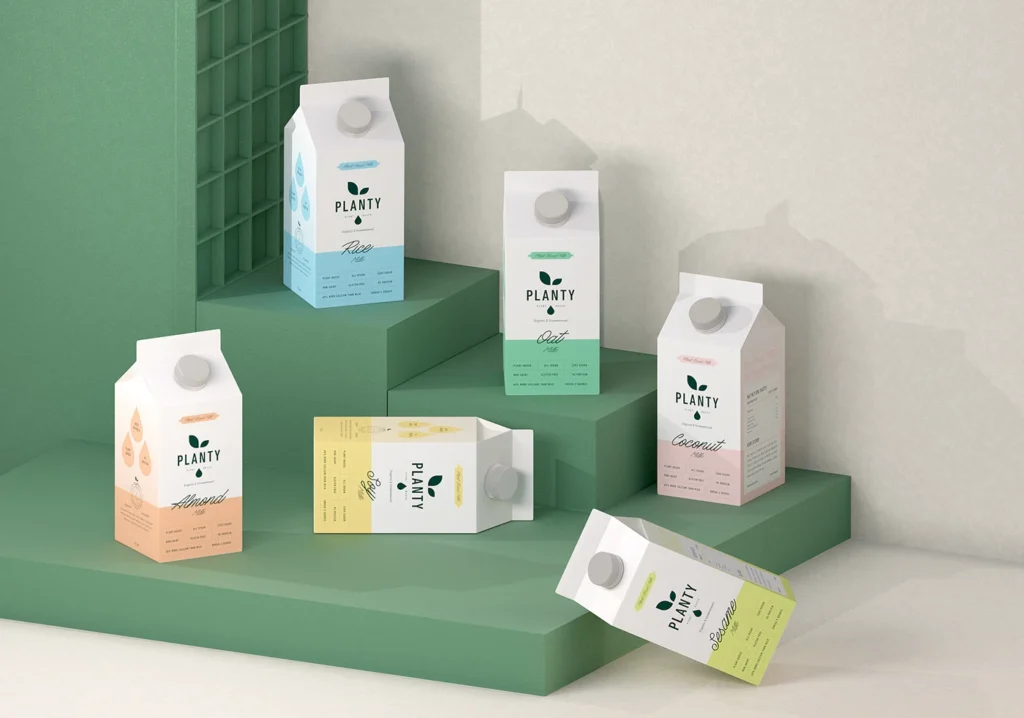
Planty is an example from our own work. The identity was built to work across flavours, pack sizes and future products, and the case study describes the colour decision this way: “Each flavor has its own color story, allowing the full range to feel cohesive but uniquely identifiable at a glance.” A range of that kind can later be sold together, as described in designing a gift set for a product range.
The other side of a wide range is the count. Every extra pack adds an artwork to check, a barcode, a set of images and a page. 3 risks grow with the range:
- Errors. Shared text is copied across many files, and a late change to 1 line has to be made in every file.
- Thin proofing. There is less time per pack to print it at full size and read it.
- Uneven stock. Some variants may sell faster than others, and all of them were printed.
If you launch wide, set the system before the artwork. Draw 1 pack to a finished standard, agree it, and only then roll the layout out across the other packs. The table below compares the starting points.
| Starting range | Design work | Main risk |
|---|---|---|
| 1 product, 1 size | 1 artwork, 1 barcode, 1 image set and 1 page; most of the time goes into the system | The pack cannot show which elements are brand and which are variant |
| 2 or 3 products, 1 size | 2 or 3 artworks on 1 layout; variant colours chosen as a set | Colours and names chosen without the later range in mind |
| 3 products, 2 sizes | 6 artworks, 6 barcodes, 6 image sets; the layout has to work at both sizes | The count is underestimated because the range is described as 3 products |
| 6 or more packs across flavours and sizes | A full system first, then a rollout across every pack | Copy errors across files, less proofing time per pack, uneven stock |
| Single packs plus multipacks | An outer pack artwork and a barcode for each multipack as well | Multipacks are added late and drawn outside the system |
Decide what stays fixed and what changes
Whatever the launch number, the system should be drawn for the range that comes later. In practice that means sorting every element on the pack into 2 lists.
The fixed list holds what never moves: the position of the mark, the type hierarchy, the information block and the shelf-facing panel. The changing list holds what tells one product from another, and it should be short. Often it is 1 colour, 1 name and 1 line of description. How to choose that colour against the codes of the category is covered in category colour codes in packaging.
Two of our case studies show the split. For Rally, a sparkling yerba mate tonic, the Rally case study says: “Each variant uses the same structural layout while changing accent colour, allowing Original, Blood Orange and Ginger Lemon to feel distinct without fragmenting the range.” That is 3 flavours on 1 layout with 1 variable.
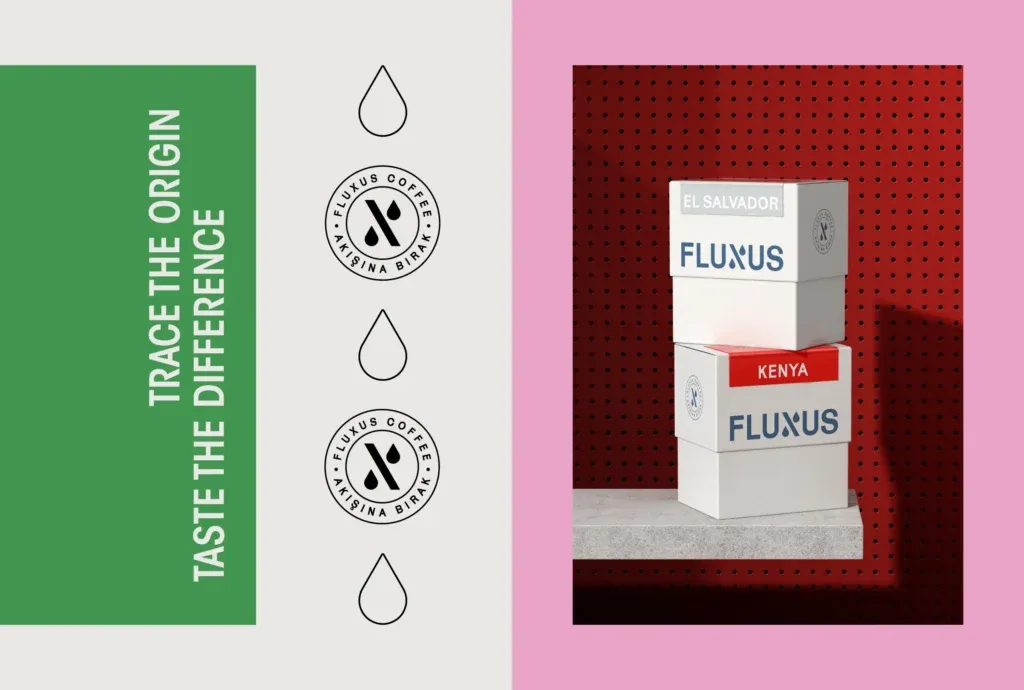
Fluxus Coffee sells by origin, and its range had outgrown its first system. We rebuilt the label so that the difference between coffees is carried by colour and pattern. The Fluxus case study gives the result in a few words: “a new origin enters the system without a new design”.
Use that sentence as a test for your launch range. Take product number 4, the one you have not developed yet, and ask what would have to be drawn for it. If the answer is a colour, a name and a barcode, the system is ready. If the answer is a new layout, the first 3 packs were designed as separate labels.
How to choose your launch number: 5 questions
There is no correct number, and we will not give one here. The right range for a tea brand selling online differs from the right range for a snack going to a retailer. What we can give is an order of questions to work through.
- What is each product for? If 2 products answer the same need for the same buyer, the second adds work and little choice.
- Which sizes will you sell on day 1? Each added size adds a full row of packs to the grid.
- What does your printer require? Ask for the minimum order per version and whether versions can share a print run. The answer may make 4 flavours practical, or it may point to 2.
- Where will it be sold? A retailer may expect a certain number of products or facings, and that varies by shop, so ask the buyer. Online, 1 product with variants can be enough to open.
- What can you keep in stock? Every variant is a stock line to fund, store and reorder.
Then compare the count from the grid with the answers. If the grid says 12 packs and the answers support 4, the range is too wide for the launch, and the other 8 become the plan for the second print run. The design system should already have a place for them.
Planning a launch range with MarkaWorks
We plan the range before we design the first pack. In our packaging and product design work, MarkaWorks starts with the structure: the pack format, the material, the closure and the production method. For a range, we then fix the constant elements, which are the mark position, the type hierarchy, the information block and the shelf-facing panel, and define what changes for each variant.
For a launch, that gives you 2 things:
- A system that separates the fixed elements from the variable ones, so product 4 or 5 can be added later without a redesign.
- Production artwork for each pack on the producer’s dieline, and the working files.
Range decisions often begin before packaging, with how the brand is positioned and how the products are named. If you are at that stage, see our brand strategy and visual identity service. They end on the product page, where each pack and variant needs its place; that side is our website and digital design service. Our project pages list 17 food and beverage case studies and 20 in coffee and tea.
If you are deciding how many products to launch with, you can work with us on the range. Tell us what you plan to launch and we will show you how we would structure it.
Questions founders ask about the size of a launch range
Is it better to launch with 1 product or several?
Neither is better in general. A single product concentrates the design work but cannot show a range system. Several products show the system and multiply the artwork, barcodes, images and pages. Count the packs in a grid of products and sizes, then check the number against your printer’s minimums and your stock plan.
Does every flavour and size need its own barcode?
Plan as if it does. The GS1 GTIN Management Standard has 10 rules, and their titles include new product introduction, declared net content and pack/case quantity. We work from the overview page only, so confirm each case with your GS1 member organisation before the artwork is final.
How many products do I need to make a block on a shelf?
We cannot give a number, because it depends on the width of the pack, the shelf the retailer offers and how many facings each product gets. Ask the retailer what space is available, then decide whether 1 product in several facings or several products fills it better.
Can I add products later without redesigning the packaging?
Yes, if the system was set at the start. Fix the mark position, the type hierarchy and the information block, and keep the list of changing elements short, such as 1 colour and 1 name. A new product then needs a colour, a name and a barcode.
More brands we brought to life: